






sonicwp7
Utente Registrato
-
Iscritto il
-
Ultima visita
Tutti i contenuti di sonicwp7
-
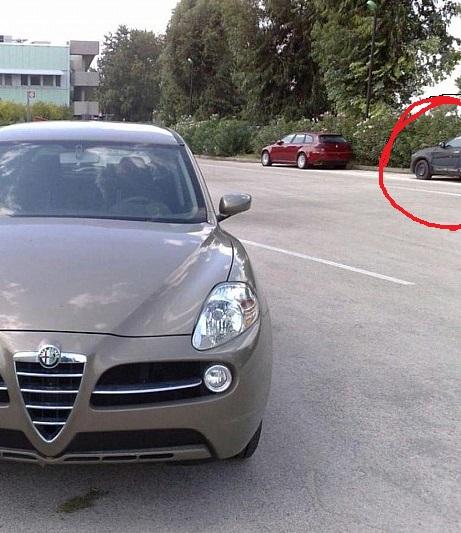
secondo me adotteranno una soluzione simile alla mobi...facilito il confronto con l'attuale plancia cambiano anche i comandi del clima, ora in stile levanteragazzi, già avevo segnalato un pò di tempo fà che giravano nella mia zona alcune renegade e 500x in compagnia della kia sportage modello precedente, oggi mi è ricapitato di fare lo stesso incontro 2 renegade e questa kia sportage (old) bianca e con loghi coperti da nastro , ancora clinic test?


Account
Navigation
Cerca
Configure browser push notifications
Chrome (Android)
- Tap the lock icon next to the address bar.
- Tap Permissions → Notifications.
- Adjust your preference.
Chrome (Desktop)
- Click the padlock icon in the address bar.
- Select Site settings.
- Find Notifications and adjust your preference.
Safari (iOS 16.4+)
- Ensure the site is installed via Add to Home Screen.
- Open Settings App → Notifications.
- Find your app name and adjust your preference.
Safari (macOS)
- Go to Safari → Preferences.
- Click the Websites tab.
- Select Notifications in the sidebar.
- Find this website and adjust your preference.
Edge (Android)
- Tap the lock icon next to the address bar.
- Tap Permissions.
- Find Notifications and adjust your preference.
Edge (Desktop)
- Click the padlock icon in the address bar.
- Click Permissions for this site.
- Find Notifications and adjust your preference.
Firefox (Android)
- Go to Settings → Site permissions.
- Tap Notifications.
- Find this site in the list and adjust your preference.
Firefox (Desktop)
- Open Firefox Settings.
- Search for Notifications.
- Find this site in the list and adjust your preference.