





giorgio
Utente Registrato
-
Iscritto il
-
Ultima visita
Tutti i contenuti di giorgio
-
-
https://it.finance.yahoo.com/notizie/maserati-presenterà-molto-presto-nuovo-125706098.html Maserati presenterà molto presto nuovo piano industriale - AD MODENA, ITALIA (Reuters) - Maserati intende presentare un nuovo piano industriale a breve, subito dopo l'insediamento ufficiale a fine mese di Antonio Filosa, il nuovo amministratore delegato della controllante Stellantis. Lo ha detto Santo Ficili, AD dell'unico marchio nel segmento lusso del gruppo. Stellantis sta rivedendo le strategie di Maserati dopo la sospensione del precedente piano industriale lo scorso anno e non è al momento in programma il lancio di nuovi modelli. Ficili ha affermato che il piano è in fase di finalizzazione e non comprenderà solo nuovi prodotti, ma anche una riprogettazione dei rapporti con i concessionari e la rete di assistenza. "Abbiamo le idee chiare su cosa vogliamo fare, speriamo di essere pronti molto presto", ha detto Ficili al Motor Valley Fest di Modena, dove ha sede Maserati. "Aspettiamo che Antonio assuma il suo incarico", ha aggiunto. La scorsa settimana Stellantis ha nominato l'italiano Filosa, già capo del Nord America, nuovo AD. La sua nomina sarà effettiva dal 23 giugno. "Antonio ama il marchio (Maserati), sono sicuro che faremo grandi cose", ha detto Ficili, aggiungendo che Maserati continuerà a progettare e produrre tutti i suoi modelli in Italia. In merito alle speculazioni di mercato secondo cui Stellantis potrebbe valutare la vendita di Maserati a fronte di risultati scarsi e vendite in calo, Ficili ha ribadito che il gruppo non ha alcun piano di disinvestimento. Ficili, che è anche a capo del marchio premium Alfa Romeo di Stellantis, ha affermato che è imminente anche una revisione del piano di Alfa. Il gruppo ha incaricato la società McKinsey di fornire consulenza sulle strategie di Maserati e Alfa Romeo, che devono affrontare l'impatto dei dazi statunitensi. Maserati realizza circa il 30% delle sue vendite negli Stati Uniti, mentre Alfa Romeo circa il 15%.
-
https://www.gazzetta.it/motori/la-mia-auto/25-05-2025/alfa-romeo-stelvio-cosa-succede-elettrica-ibrida.shtml Il dubbio dell'elettrico Ad anticipare la situazione pensava il 17 maggio scorso il segretario provinciale dei metalmeccanici Cisl, Mirko Marsella: "Sulle linee è tutto pronto ma è la vettura a non essere pronta. Le nuove Alfa erano programmate in versione solo elettrica, ma ormai s’è capito che unicamente l’ibrido riesce a vendere e quindi si sta lavorando per produrre la Stelvio anche con l’endotermico". È un fatto che la effettiva domanda di vetture elettriche risulti inferiore a quelle attese sul mercato europeo che giustificavano la nascita dei modelli su piattaforma modulare Stla Large, concepita fin dall’inizio esclusivamente per vetture a batteria. Nei mesi si sono alternate aperture sempre più frequenti dell’azienda, che ha confermato ripetutamente come fosse "in valutazione" la produzione di Alfa Romeo Stelvio anche in una versione ibrida, a benzina o gasolio, di cui non erano note le specifiche. Secondo voci di stampa, Stelvio e Giulia sarebbero in ritardo proprio perché la piattaforma Stla Large non riuscirebbe ad ospitare per ora motorizzazioni ibride, guardando nello specifico a quelle di tipo plug-in hybrid. A quanto risulta a Gazzetta Motori, che ha interpellato direttamente le rappresentanze Fim-Cisl della fabbrica di Cassino, la situazione pare perfino più complessa. Infatti è stato dichiarato che "del processo di adattamento e transizione della piattaforma Stla Large su Alfa Romeo Stelvio e Giulia non si hanno attualmente notizie", con l’ultimo aggiornamento ai lavoratori che risale al gennaio scorso e risoltosi in una generica "evidenza di opportunità" nel dotare Stelvio e dunque anche Giulia di motori a combustione, anche se non esiste finora nessun esemplare di preserie equipaggiato con questa soluzione. Stellantis sarebbe dunque ferma alla sola ipotesi di riallineare la piattaforma Stla Large, che comporterebbe una ridefinizione meccanica non trascurabile tanto per Alfa Romeo Stelvio che per Giulia. A conferma della delicatezza della situazione, arriva una dichiarazione ufficiale che fotografa la fase di ripensamento: "Stellantis fa sapere, tramite un portavoce dell’azienda, che sta lavorando su un aggiornamento del piano dedicato all’Italia. Il piano prevede un ampliamento e una rimodulazione delle attività nel Paese, alla luce delle attuali condizioni di mercato, delle incertezze sulle regolamentazioni Ue e dell’effetto dei dazi. Un dialogo costruttivo è in corso nelle sedi opportune".
-
-
-
-
Imparato: "A giugno novità sul Piano per l'Italia" "Fra alcuni giorni vedrò il governo per aggiornamenti sulla produzione di motori, ma anche su Maserati. A giugno ci sarà un aggiornamento del Piano Italia", ha spiegato il manager, aggiungendo che le novità riguarderanno anche Atessa, la maggior fabbrica di veicoli commerciali leggeri del Vecchio continente. Per ora non sono stati forniti dettagli, ma un'altra frase cela un indizio sulla possibilità che vengano aumentate le produzioni, soprattutto di motori ibridi: "Abbiamo lanciato 14 modelli fra il secondo semestre del 2024 e la prima parte del 2025 con varie alimentazioni. La mia sfida oggi non è lanciare più macchine, ma avere i motori giusti, sviluppando soprattutto ibridi e range extender. Su 2,5-2,7 mln di auto che vendiamo in Europa l'ibrido rappresenta più del 60%". "Vogliamo produrre in Europa, ma a un costo competitivo. È una sfida, ma si può fare. Il costo del lavoro e il costo dell'energia sono punti chiave. Se in Spagna produrre un auto costa uno, in Francia è due, in Italia tre in Germania quattro. Ci sono poi i costi della regolamentazione che vanno rivisti perchè dobbiamo ricordare che il 60% delle auto che si vendono in Italia sono sotto i 40 mila euro. Dobbiamo produrre, ma a costi minori e anche gli oneri di regolamentazione vanno modificati". https://www.quattroruote.it/news/industria-finanza/2025/05/14/stellantis_a_breve_novita_sul_piano_per_l_italia.html
-
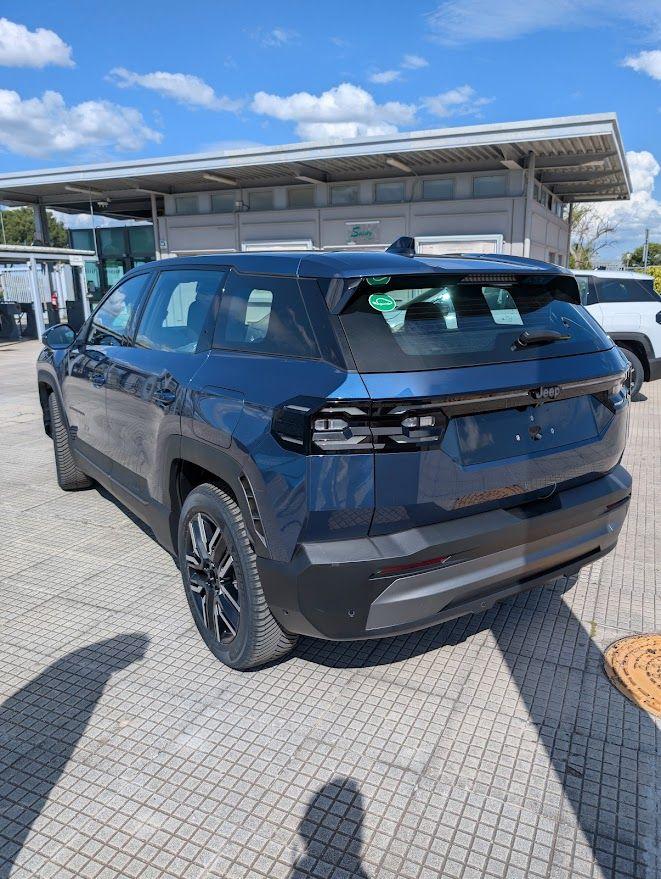
Ho fatto questo confronto prestazionale usando Zeperfs tra una Ypsilon 1.0 Hybrid (credo che come pesi dovremmo essere lì con 500) e una Picanto 69cv: https://zeperfs.com/it/duel8684-12394.htm Confronto tra Ypsilon 1.0 e 500 1.0: https://zeperfs.com/it/duel8531-8684.htm Poi ho trovato questo vecchio articolo su InsideEVs, confronto tecnico con pesi e dimensioni tra 50e e vecchia 500 1.0 Hybrid: https://insideevs.it/reviews/450594/fiat-500-elettrica-piattaforma-batteria-motore-tecnica/Quattroruote da queste misure: Dimensioni La nuova generazione della Jeep Compass è cresciuta parecchio nelle dimensioni, riposizionandosi nella parte alta del segmento C. La Suv è lunga 4.552 mm (+15 cm rispetto al modello uscente), larga 1.928 e alta 1.652, mentre il passo arriva a 2.795 mm. https://www.quattroruote.it/news/nuovi-modelli/2025/05/06/jeep_compass_prezzo_uscita_dimensioni_interni_motori.htmlNuova Jeep Compass, vista e toccata dal vivo, ecco com'è fatta Nuovo design, nuova piattaforma, nuovi interni e per la prima volta anche elettrica: ecco com'è la Jeep Compass 2025 https://it.motor1.com/news/758233/jeep-compass-2025-novita-informazioni/ https://youtu.be/oOQCIMuHChI?si=aPq8fBz41wN7uUbC
- 552 risposte
-
- compass
- compass spy
- j4u
- jeep
-
Taggato come:
Stellantis, la svolta è vicina: multinazionali del farmaceutico pronte a investire Economia - Il Sindaco di Piedimonte San Germano Gioacchino Ferdinandi svela trattative avanzate per la riconversione di capannoni inutilizzati, una chance per rilanciare l'occupazione nel territorio. Si guarda con interesse anche ai progetti di Power for Future e Fincantieri per la realizzazione di mezzi destinati alla difesa. Tutti i dettagli https://www.leggocassino.it/2025/04/27/stellantis-la-svolta-e-vicina-multinazionali-del-farmaceutico-pronte-a-investire«I nuovi modelli elettrici di Giulia e Stelvio, parte del cosiddetto Piano Italia, non partiranno prima del 2026 inoltrato», secondo quanto risulta alla Fiom. Saranno realizzati sulla nuova piattaforma Stla Large e il primo modello era atteso già nel 2025 secondo i primi annunci di Stellantis. Invece bisognerà aspettare «forse la seconda metà del 2026 per lo Stelvio, sei mesi dopo per la Giulia», dice Di Traglia, «e non ci sarà una conversione ibrida a fare da ponte. Poi un altro modello non meglio specificato forse arriverà nel 2027». https://www.milanofinanza.it/news/stellantis-chiude-lo-stabilimento-di-cassino-fino-a-maggio-problemi-anche-a-melfi-e-atessa-202504161240047718
- 552 risposte
-
-

-

-

-

- 6
-
-
- compass
- compass spy
- j4u
- jeep
-
Taggato come:
Stellantis avrebbe in programma di spostare le produzioni Maserati dal complesso di Mirafiori a Modena: lo scrive l'agenzia Bloomberg, sottolineando che il trasferimento delle GranTurismo e delle GranCabrio nell'impianto storico del Tridente rientra in un più ampio piano per rendere il sito emiliano un polo per modelli di fascia alta. A Torino, invece, i maggiori volumi previsti per l'ormai imminente Fiat 500 ibrida andrebbero a compensare la perdita delle due Maserati. https://www.quattroruote.it/news/industria-finanza/2025/03/17/stellantis_maserati_mirafiori_modena.html




.jpeg.aee1d9b32591c6eaf8e80860bfe0c279.jpeg)






![Alfa Romeo Hug [Trolling Mode]](https://www.autopareri.com/uploads/reactions/Alfaromeocare.png.50be1dd8d7c15ba4fec8098a15bfa18a.png)


Account
Navigation
Cerca
Configure browser push notifications
Chrome (Android)
- Tap the lock icon next to the address bar.
- Tap Permissions → Notifications.
- Adjust your preference.
Chrome (Desktop)
- Click the padlock icon in the address bar.
- Select Site settings.
- Find Notifications and adjust your preference.
Safari (iOS 16.4+)
- Ensure the site is installed via Add to Home Screen.
- Open Settings App → Notifications.
- Find your app name and adjust your preference.
Safari (macOS)
- Go to Safari → Preferences.
- Click the Websites tab.
- Select Notifications in the sidebar.
- Find this website and adjust your preference.
Edge (Android)
- Tap the lock icon next to the address bar.
- Tap Permissions.
- Find Notifications and adjust your preference.
Edge (Desktop)
- Click the padlock icon in the address bar.
- Click Permissions for this site.
- Find Notifications and adjust your preference.
Firefox (Android)
- Go to Settings → Site permissions.
- Tap Notifications.
- Find this site in the list and adjust your preference.
Firefox (Desktop)
- Open Firefox Settings.
- Search for Notifications.
- Find this site in the list and adjust your preference.