





super pax
Utente Registrato
-
Iscritto il
-
Ultima visita
Tutti i contenuti di super pax
-
-
-
-
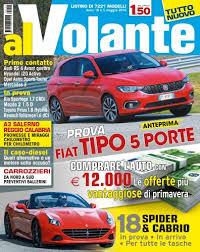
1.6 jtdm tct 120 cv allestimento SuperLa Tipo e già stata provata quasi un mese fa da Al Volante .... Prima prova in esclusiva.
 Scusa se ti rompo l' anima ma vedo che sei molto ferrato su l' argomento. Il nome ufficiale di questi cerchi quale è? Sul web li ho visti chiamare a volte ronal ( erroneamente) ho genericamente asn o sz .Potresti darmi lumi a riguardo?Hai ragione che asinoLa 75 con i Ronal è bellissima,merita un restauro.






.jpg.d7eea30cb9bbce90f04b4f08d6fe9efb.jpg)
Account
Navigation
Cerca
Configure browser push notifications
Chrome (Android)
- Tap the lock icon next to the address bar.
- Tap Permissions → Notifications.
- Adjust your preference.
Chrome (Desktop)
- Click the padlock icon in the address bar.
- Select Site settings.
- Find Notifications and adjust your preference.
Safari (iOS 16.4+)
- Ensure the site is installed via Add to Home Screen.
- Open Settings App → Notifications.
- Find your app name and adjust your preference.
Safari (macOS)
- Go to Safari → Preferences.
- Click the Websites tab.
- Select Notifications in the sidebar.
- Find this website and adjust your preference.
Edge (Android)
- Tap the lock icon next to the address bar.
- Tap Permissions.
- Find Notifications and adjust your preference.
Edge (Desktop)
- Click the padlock icon in the address bar.
- Click Permissions for this site.
- Find Notifications and adjust your preference.
Firefox (Android)
- Go to Settings → Site permissions.
- Tap Notifications.
- Find this site in the list and adjust your preference.
Firefox (Desktop)
- Open Firefox Settings.
- Search for Notifications.
- Find this site in the list and adjust your preference.