






MotorPassion
Reporter (Staff)
-
Iscritto il
-
Ultima visita
Tutti i contenuti di MotorPassion
-
-
Devo trovare la tabella dei consumi reali del 1.2 145CV perché è quello che incide nella valutazione di chi la compra. Sicuramente nel settore privato può bissare il successo del modello attuale, quel che può soffrire è il mercato flotte dove il diesel lo da ancora da padrone.
- 552 risposte
-
- compass
- compass spy
- j4u
- jeep
-
Taggato come:
-
-
Metto qui perché non saprei dove altro pubblicare.
-
Ragazzi foto rimosse, Stellantis ha già contattato altre pagine social e siti di settore chiedendo di rimuoverle. Vi chiedo quindi di evitare di ripubblicarle. Grazie
- 552 risposte
-
-

- 1
-
-
- compass
- compass spy
- j4u
- jeep
-
Taggato come:
-
Però è una comfort zone che piace al cliente, almeno per le Jeep medio piccole. Da quel che ho visto forse la plancia non mi convince molto, ma parlo avendo visto una foto a bassa risoluzione.
- 552 risposte
-
- compass
- compass spy
- j4u
- jeep
-
Taggato come:
-
Vedo che sulla pagina IG le foto non ci sono più, che sia intervenuta Stellantis?
- 552 risposte
-
- compass
- compass spy
- j4u
- jeep
-
Taggato come:
-
Al momento la migliore tra le sorelle STLA Medium. Come segnalatomi da @Osv le foto arrivano da AutomotivePress che aveva pubblicato tutto per poi cancellare la pagina al volo. C'erano anche le foto della plancia ma non riesco a recuperarle in formato HD.
- 552 risposte
-
- compass
- compass spy
- j4u
- jeep
-
Taggato come:
-
Un nuovo brand ruffiano nato per tenersi in buona i nazionalisti. Ok che bisogna diversificare i propri investimenti ma serviva proprio ad un imprenditore come Bezos investire in questa cosa? Forse per tenersi in buona l'attuale amministrazione americana? Un brand di pick-up basoni e mediocri dal punto di vista estetico e tecnico? Che poi "interamente costruito in USA per evitare i dazi" sarei curioso di vedere dove vengono prodotte tutte le componenti. In ogni caso se si vuole fare del sarcasmo pungente, per riuscire a fare una vettura completamente americana hanno dovuto mettere vetri a manovella, togliere l'infotainment e togliere la vernice. 😅 Per lo spot pubblicitario ci vedo bene Katy Perry con in mano una margherita. 🤪Bella internamente, anche se come per la maggior parte delle nuove vetture il tutto risulta un po' privo di personalità del brand. Esternamente non mi piace, piena di nervature e pieghe che trovo applicate a forza per cercare di dare uno spirito Lexus ad un corpo vettura che di Lexus ha poco e risulta pesante. Che deriva dalla GA-L utilizzata su Toyota Mirai!?
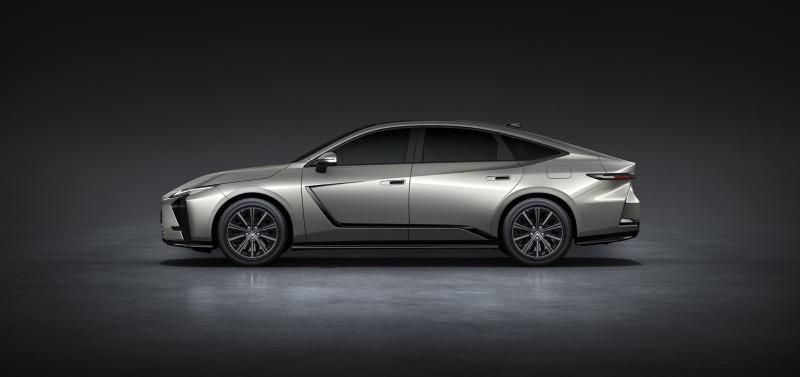
 Ha un che di Lincoln.





.jpg.074a660dcb38f034822d8d413ca40391.jpg)
.jpg.519a1f7ba2adc8d66e93ee6e35a36aed.jpg)
.jpg.0143ebfa1aa40438c9bdae89cddf4f19.jpg)
.jpg.bfe9be6fd7924aeedae78d0e836a9d8e.jpg)
.jpg.5da3438379da29e6b983a9c3f870060f.jpg)
.jpg.fac0adee0515464af745df3a0d0fbe3e.jpg)
.jpg.f7ef54630d5998712a31d6a8eb20fc34.jpg)
.jpg.8335945f7ee9def74ab92dbca63aacc7.jpg)
.jpg.0c713bd6832462470182e9592092926f.jpg)
.jpg.ee497366d2c585be6c64ff46254f1782.jpg)
.jpg.cea8afba173b8d889268a161bdb3f894.jpg)
.jpg.f373666e4436eb8635b88c360a4b4678.jpg)
.jpg.c90bc3897d09eb8cf80a5935837572ba.jpg)
.jpg.a056a8ab41c6e8da8add725b1548bf73.jpg)
.jpg.6599b7718a2f096d5211e6bc654094ab.jpg)
.jpg.f7a6d4aa3e7bf769d75407e17ca6c5e7.jpg)
.jpg.90d9e0aaab3900768acf75a962e6c14c.jpg)














![VAG Hug [Trolling Mode]](https://www.autopareri.com/uploads/reactions/Volkswagencare.png.d8857dae0567cc6602dfdb1c9cbeb700.png)
.png.a5e40e26af9d0375729cec3b4036ea5f.png)