Classifica Utenti
Utenti più Apprezzati
(Scegli il periodo) Utenti più Apprezzati
(Storia giorno per giorno) Classifica dall'Origine
(da Marzo 2003)
(Scegli il periodo) Utenti più Apprezzati
(Storia giorno per giorno) Classifica dall'Origine
(da Marzo 2003)
-
Savage
Utente Registrato13Punti828Numero contenuti pubblicati -
pennellotref
Utente Registrato13Punti7272Numero contenuti pubblicati -
vallifire12
Utente Registrato8Punti100Numero contenuti pubblicati -
Kippur
Utente Registrato8Punti3430Numero contenuti pubblicati



Contenuti più Popolari
Stai visualizzando i contenuti con il più alto punteggio, pubblicati in data 10/01/17 e localizzati Tutte le aree/sezioni
-
In cima ? Quale cima ? Immagino che ti sia capitato di leggere in giro un po' ovunque cosa si dice su Alfa per una paio (si fa per dire......7 per la precisione) di aggiornamenti software al primo MY di un modello integralmente nuovo......Pensavi che bastassero un paio di video, qualsiasi essi siano, per cambiare le cose ? O un paio di buone recensioni ? P.S.: per inciso, in USA siamo al 34° aggiornamento software per il MY 2017 della Serie 3. Ti risulta che qualcuno ne parli ? Ti devo ricordare il budget marketing della triade ? E' così che doveva andare con Alfa ! Era inevitabile, non facciamo gli ingenui.... E soprattutto, non dobbiamo commettere l'errore di pensare che i clienti effettivi e potenziali siano come tutti noi, ossia degli appassionati, perché in realtà come tu ben sai è vero l'esatto contrario; siamo noi le mosche bianche che "perdono tempo" a dibattere attorno ad un video o ad un assetto. Se fai un giro su Instagram (account ufficiali di dealer Alfa in USA) è semplicemente "inquietante" la percentuale - altissima - non solo di giovani "millennials" che acquistano Alfa, ma soprattutto di giovani donne tra i 25 e i 45 anni. Domanda....Secondo te, sanno dove sta il 'Ring o cosa sia un recupero di camber o un quadrilatero all'anteriore ???? L'unico vero motivo per cui si fa una cagnara del genere attorno ad Alfa non coincide con un video più o meno farloccato (ad arte.....IMHO) ma con il fatto che Alfa è una minaccia; quanto grande nessuno lo sa, ma certamente lo è.5 punti
-
4 punti
-
4 puntiPer Lancia, indagini di mercato o no, basta fare buoni prodotti e dare un'immagine decente al Brand. Basta vedere quello che VAG è riuscita a fare con Seat e Skoda.4 punti
-
Io parlo per esperienza diretta..In "cima" vuol dire per me vedere finalmente la fiamma negli occhi di chi si ferma a parlarti ..a chiedere...a complimentarsi.Vissuto con la Quadri ben piu che con marchi posseduti..molto piu blasonati.Vuol dire in certe nazioni estere essere salutati da tutti gli alfisti che arrivano in direzione opposta con il pollicione ...come si fa tra motociclisti.In cima vuol dire leggere su M3post tana di emmisti fanatici come ero io un tempo..che una certa parte di loro è disposta a cambiare e non aver vergogna a dirlo..Vuol dire leggere su Germancarforum che la gente è disposta a credere ad Alfa ed a perdonare gli inevitabili richiami della prima serie di Giulia.In cima vuol dire questo e molto altro e non necessariamente vendere milioni di auto...adesso..ma avere delle prospettive per il futuro del marchio.In cima o ci resti adesso o fai solo del male a te stesso dopo tanti sacrifici..ma capisco di avere un punto di vista di parte..4 punti
-
4 puntiInfatti mi riferivo a chi ha deciso di chiamarla Gingo e non Panda. Ringraziamo la Renault che ha impedito lo scempio.4 punti
-
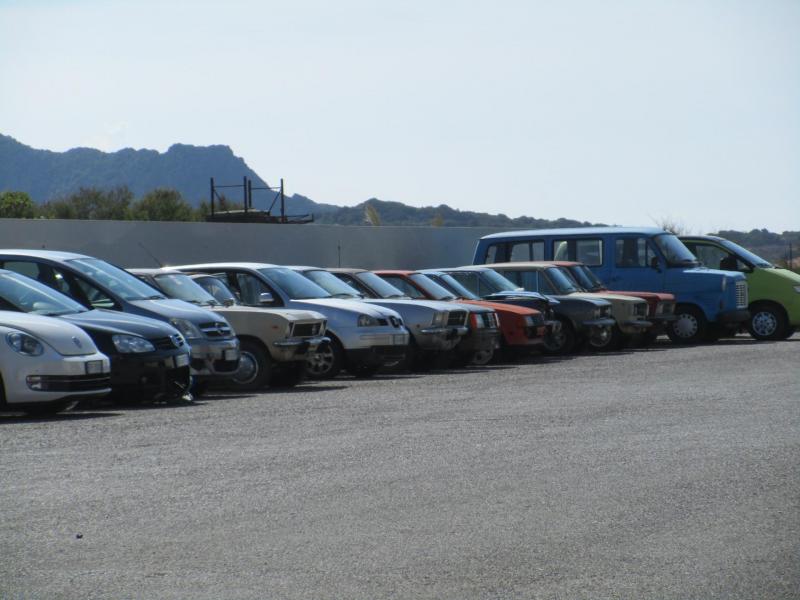
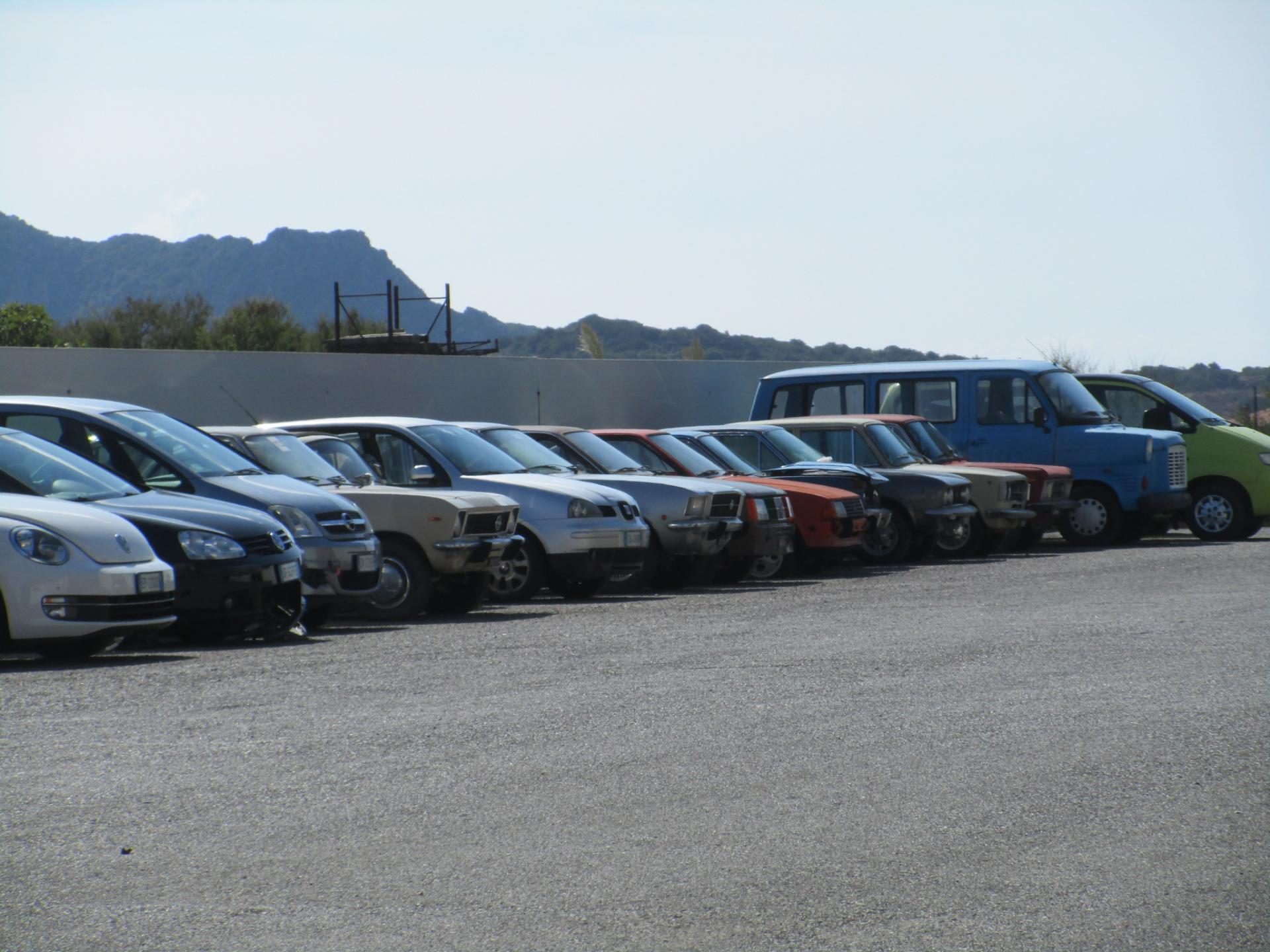
Di ritorno da una settimana sarda, ci sarebbero state occasioni ma ero distratto, mi porto dietro solo questo cortile di una grande carrozzeria di Carbònia, alcune lì da tempo, forse aspettano un benefattore.... ce n'è quasi per tutti i gusti, pregevole l' Ascona !
 4 punti
 -
3 punti
-
Io continuo a non vedere nulla di sbagliato, FCA ha postato un, come da loro definito in cartella news, un footage del record al ring. Ora se un manipolo di lunatici schizzati che hanno in odio un marchio, che improvvisamente da "macchinedemmerda" ti infila il suo redivivo Biscione nel dereto, gli rimarrà il bruciore. Per tutto il resto del 99,999% di appassionati e non, si tratta di un bel progetto che richiede tempo per accreditarsi quanto ad affidabilità. Cosa che a quanto pare, da alcuni commenti usa, stia grazie agli aggiornamenti avvenendo... Period Ci lavoro pure io, due o tre colpi per conoscere il bersaglio e poi vanno giù, il fatto incredibile e che attaccano loro senza essere provocati, e più forte.3 punti
-
Sul ....Doic uber alles un paio de coions siamo perfettamente d'accordo visto che ci lavoro con calzini bianchi e li conosco bene....Sono spesso superiori solo nel loro incoscio come descritto in precedenza.Basta non dargli altri spunti e li smonti credimi.....mannaggia a "noi"3 punti
-
3 puntiMah il team Ferrari sarà pure uno schifo come dite e vettel un brocco rispetto agli altri piloti top, io però ho visto una Ferrari in pista partire ultima e arrivare quarta dopo aver inanellato una cosa come 10/15 giri record e aver battuto anche il record della pista. Ho visto vettel recuperare una cosa come 20 secondi o simili a ricciardo a bordo di una red bull seconda solo a Ferrari in velocità quest'oggi. E ho visto anche bottas umiliato in mondovisione, fattosi riprendere da uno partito ultimo dopo aver girato terzo al primo giro. Voi continuate pure a vedere il mondiale che credete, o a trollare a questo punto perché leggo cose che non stanno ne in cielo ne in terra. Nonostante la sfiga ci veda benissimo ricordatevi dove stavamo l'anno scorso prima di attaccare a caso prima guida e team. Sono fermamente convinto che la Ferrari sia la macchina più bilanciata quest'anno, e anche quella da battere, soprattutto ora dopo l'ultima evoluzione del motore, a parte Monza dove a mio modo di vedere le cose si è sbagliato palesemente il set up, nei circuiti dove noi si era dati per spacciati ci si è difesi alla grande e dove si doveva vincere si è vinto. Ora togliete il fattore sfiga e vedrete materializzarsi almeno 50 punti in più per vettel nel mondiale piloti e in quello costruttori, tra gomme che scoppiano episodi nefasti e incidenti imbarazzanti. Forza Ferrari sempre ora più che mai. ☏ iPhone ☏3 punti
-
3 punti
-
Chiedo per capire. Quindi sui forum che io (certamente meno di te...) frequento è tutto un "buttar giù dalla torre" l'untore biscionato ? E questo perché ? Per un video che non è più vero o più falso - come tu ben sai - di tanti altri, a partire da quelli teutonici ? E tutti i discorsi che si fanno sui forum di appassionati relativamente alla sostanza e bontà del prodotto ? Che fine hanno fatto ? Almeno lì si parla dei 34 aggiornamenti software della Serie 3, vero ? Qualcuno pensa realmente che Giulia/Stelvio siano dei fake ? Ma veramente ? Se è così, problemi loro....I fan boys imho sono una brutta razza ...... P.S.: parlando del rapporto italiani/stranieri di comprovata superiorità.....Giorni fa ho letto un'intervista a Gabbana (na, non ni eeehhhh ), cui si chiedeva un commento relativamente all'ennesimo (la storia dura da anni) articolo denigratorio del NYT all'indirizzo della Milano Fashion Week. Risposta di Gabbana: che vadano a farsi fottere, la moda italiana ha i fatturati in continua ascesa. Sono anni che dicono peste e corna, per quanto ci riguarda noi D&G facciamo selezione all'entrata ed i giornalisti dell'NYT non li facciamo entrare. Se dici che la nostra moda fa cagare da anni, perchè pretendi di assistere alle sfilate ? Viaaaaaa, sloggiareeeeeee. Imho, fanno bene. Jalopnik ha chiesto ufficialmente spiegazioni ad FCA; sono in attesa di riceverle da qualche PR. Mi auguro che li mandino a farsi fottere e che non rispondano, se non con i fatti, al momento opportuno ed urbi et orbi. E comunque......ognuno ha il 'gate che si merita, chi il Dieselgate, chi il 'RingGate3 punti
-
La discussione è diventata stucchevole. Si è iniziato discutendo se il video fosse vero o fasullo... e nonostante io abbia specificato VARIE VOLTE (con tanto di grassetto e sottolineatura in diversi post) che tutto il mio discorso è sul fatto che sia stato messo online un "video fake", vengo addirittura accusato: 1) di aver montato io il video ad arte 2) di sostenere che la Stelvio non ha fatto un giro in 7.51. Sfido chiunque a trovare una sola riga di critica all'Alfa Romeo Stelvio Q in tutti i miei interventi. Sfido chiunque a trovare una sola riga in cui affermo che la Stelvio non ha mai fatto 7,51 al Ring. Sinceramente la discussione, anche animata, mi è sempre piaciuta, ma discutere con gente che risponde per partito preso difendendo il video senza nemmeno leggere cosa ho scritto è davvero deludente e sinceramente inutile. Divertitevi.3 punti
-
3 puntiVettel: "Stavo all'esterno per prendere più gomma possibile e ho avuto un contatto con Stroll. Non era proprio necessario concludere il week end in questo modo. Cambio distrutto? Non so, dobbiamo aspettare la macchina" A giudicare dall'espressione durante l'intervista .... pare di si Anche il porta ruota di scorta si sono inventati3 punti
-
3 puntiSono andato a lavarmi i denti all'inizio dell'ultimo giro, tanto cosa vuoi che succeda ormai, salgo in camera entro nel forum e leggo che sono stati capaci di prendersi addosso nel giro di rientro.3 punti
-
Ultime 5 pagine imbarazzanti, si è arrivati a parlare di Uno pur di giustificare le prestazioni di questa Polo. Poi quando si parla di 1.2 Fire su Punto, tutti col fucile puntato. Da oggi non è più un chiodo, ma un missile! (Del resto, in un altro topic, si dà del missile anche ad una VW Up...)3 punti
-
3 puntiSinceramente non condivido neanche questo flame... ? È indubbio con il senno di poi che certe scelte, anche dell’attuale dirigenza, sul brand Lancia non siano state le migliori. Posso anche capire chi, appassionato del marchio, possa avere il dente avvelenato. Trovo però stancante ai fini della lettura questo continuo rimarcare il proprio astio nei confronti di questi, usando poi l’assioma che siccome io avrei fatto diversamente, e visto che i loro risultati sono stati negativi, allora quello che penso io è giusto e tutto ciò che fanno/faranno è sbagliato a prescindere.3 punti
-
It's funny how nobody put in the question Panamera's lap time which never had full lap available on You Tube.3 punti
-
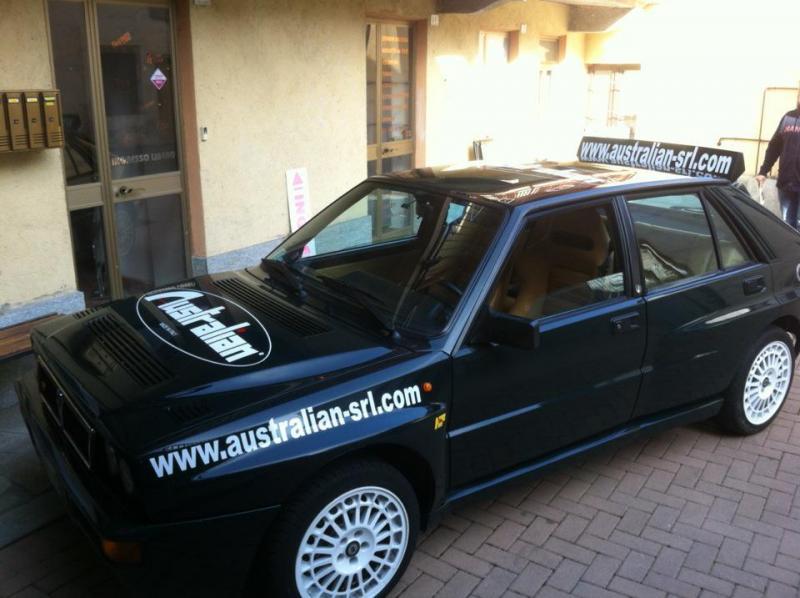
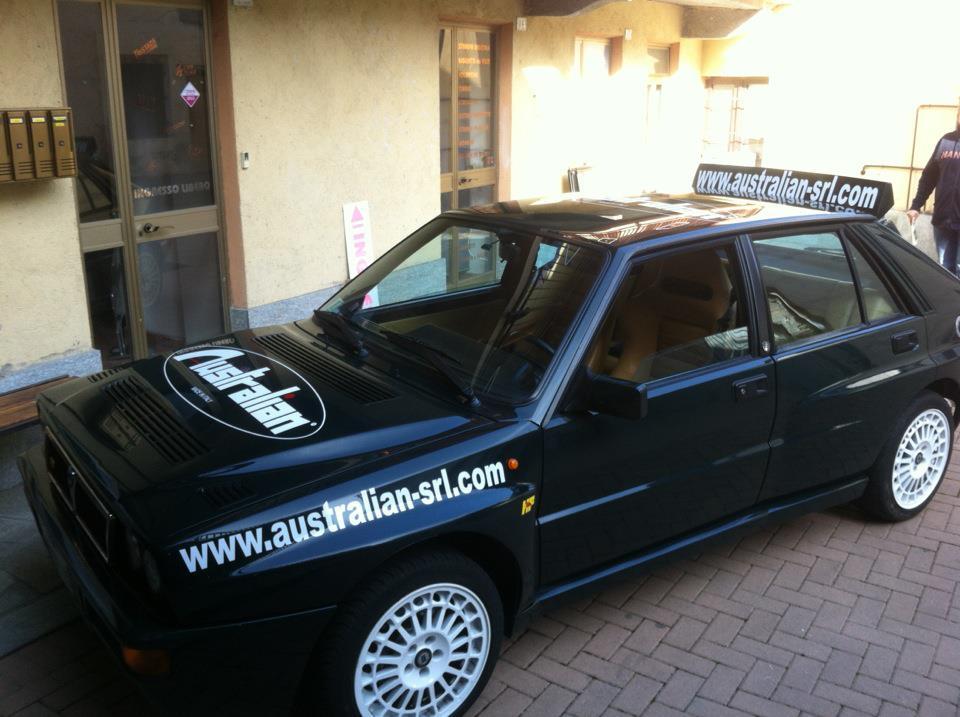
3 puntiBuongiorno a tutti....dopo il ricovero e le amorevoli cure del carrozziere,sono tornata a casa...ma il mio padrone mi sfrutta gia'...nemmeno il tempo di riposare un po'... Domani si fa da apripista ad una gara locale....mettiamo sti due adesivi...
 3 punti
 -
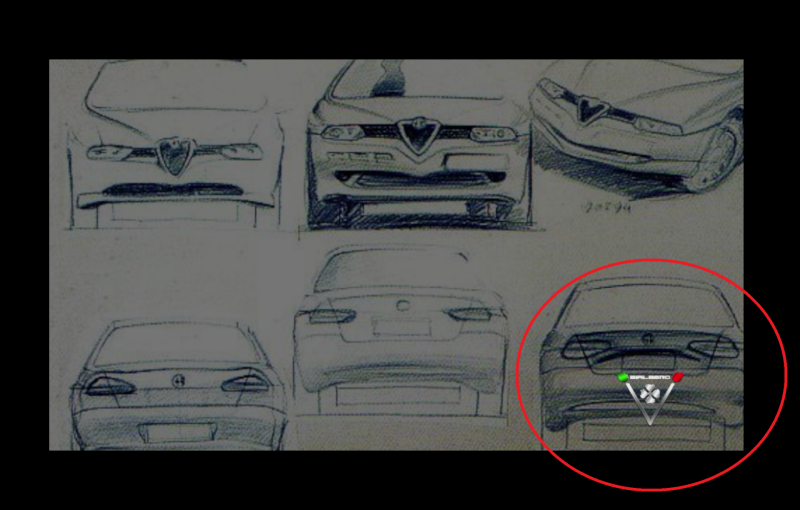
3 puntiOgnuno ha le sue opinioni in base alle esperienze che ha avuto e conoscenze che ha incamerato nel corso degli anni. Non è rispettoso nemmeno, dopo aver messo in saccoccia le maquettes di 916 a metà anni '80, tirare fuori un Proteo a loro ispirato, in ottica lancio nuovi GTV e Spider per gli anni '90, e poi presentarli insieme ad un paio di schizzi realizzati in seguito e dire al mondo che li hai fatti tu. Non è rispettoso nemmeno andare al Salone di Torino, in mezzo alle concept su base Punto '93, a dire che l'unica decente è la Punto di serie. Se ti atteggi a star del car design e manchi di rispetto continuamente al lavoro degli altri, questo è quello che ti torna indietro. Soprattutto quando ci sono altri designer che possono mostrare con dovizia di informazioni quanto hanno davvero realizzato. Un conto è avere la paternità di diverse automobili nate in un Centro Stile, nel senso di averle concepite da una idea nata nella tua testa, un altro conto è essere un grande direttore d'orchestra che sa scegliere ed indirizzare la ricerca stilistica per una vettura nella giusta direzione. Nessuno dice che WDS non lo sia, oltre ad essere persona che indubbiamente sa vendere molto bene la sua immagine. L'affermazione "Pininfarina presentò la solita Peugeot con marchio Alfa" è una cattiveria gratuita. Anzitutto son le Peugeot ad essere Alfa, dato che la 405 nasce in Pininfarina DOPO la 164 (che già prima era 154 cioè la media che avrebbe dovuto sostituire Giulietta secondo le idee di Fumia, e che fu riscalata per diventare ammiraglia) da ALTRE MANI in Pininfarina, le quali si ispirarono a quel che stava facendo Fumia per Alfa, e dato che la 605 cosi com'è nata viene da Peugeot che FORSE si è ispirata in pelino a quanto aveva visto da qualche parte, perchè come ho spiegato nel topic della 605, l'ammiraglia che aveva proposto Pinin ai francesi non era affatto una copia della 164. Eppoi perchè se la proposta Pinin che cita WDS è la 434 che Fumia ha mostrato nel suo libro, sono il primo a dire che non era al top quanto la 164 ma non vedo cosa avesse di "Peugeot". Inoltre, come già detto per la 166, se sei responsabile del design di una Casa per un certo periodo, ti prendi i giudizi per tutto quanto è nato in quel periodo, che l'abbia fatto tu o meno. Non è che puoi dire "la mia 156" quando l'auto è stata un successo, e poi "la morta 146" quando si è rivelata una vettura stilisticamente poco apprezzata, o "il cesso di 155" perchè l'ha scelta la dirigenza. Se la dirigenza ha colpe per aver scelto la 155, allora ha anche i meriti di aver scelto la tua 156. 145 e 146 nascono insieme, sotto la stessa direzione, dopo che il Canta ha chiesto di diversificare 3 e 5 porte come stavano facendo in Fiat con le future Bravo & Brava. Al lancio escono decine di bozzetti riguardo tutti i temi tipici di 145, che la mostrano come grande idea di WDS con il finestrino anteriore a scalino (nato dalla mente di Cressoni per la Cinquecento e poi cassato) e la plancia scavata davanti al passeggero (grazie alla quale abbiamo avuto un enorme spazio che quasi nessuno ha mai utilizzato, a meno che di voler fare la bicicletta con le gambe, ed in cambio un cassetto portaoggetti in cui ci stavano giusto i preservativi), per la 5 porte un paio di schizzi buttati lì senza troppa enfasi. Oggi la prima rimane una delle grandi idee di WDS, la seconda una boiata della dirigenza. Boiata che l'hanno costretto a fare, con il fucile puntato, cancellando qualche altra sua meravigliosa idea? Beh, la sua idea iniziale era di fare la 145 a 3 e a 5 porte, e la 5 porte riprendeva in pieno il carry over della Tipo. Stesse identiche portiere. Una Tipo con il muso Alfa e un posteriore differente. Come quel cesso di 155 nei confronti della Tempra. Tutte vetture imposte da una dirigenza taccagna che imponeva l'utilizzo di una scocca comune? Certo. Però non è che la 145 che ha avuto più successo è una tua GRANDE IDEA e la sorella una porcheria di cui non hai colpe. Presentiamo la 164 Super e diciamo che abbiamo ideato questo e quello per rinnovare la sua immagine, e poi viene fuori che le abbiamo messo addosso i paraurti ed i fascioni che Fumia aveva proposto sulle coupè e cabriolet che non sono venute alla luce? Va tutto benissimo, perchè alla fine il mondo del car design è questo. C'è un risultato finale e quando hai la possibilità di andare a ritroso a scoprire i dietro le quinte, trovi che c'è tanta fuffa che gira. Nessuno escluso. Però c'è chi ci vive bene sapendo come funziona la faccenda, si muove con rispetto e silenzio perchè sa che ognuno ha i suoi scheletri nell'armadio. E poi c'è chi fa la star, spara alto e di conseguenza si prende le sue bordate.3 punti
-
2 punti
-
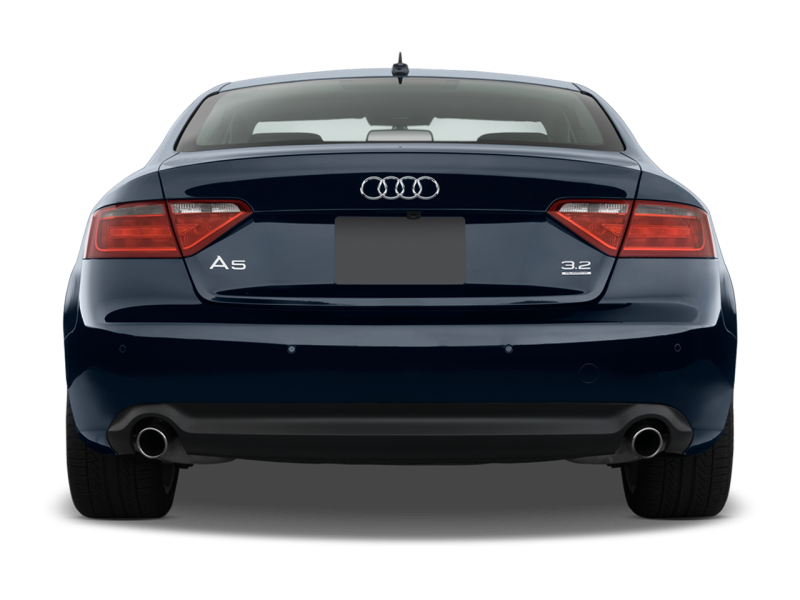
2 punti2 puntiuna lancia con due o tre modelli premium, magari ibridi, tipo mini maserati sarebbero molto più vantaggiosi che una b fiat e forse anche delle due alfa che sono uscite in un periodo dove forse la sportività non paga così tanto,ma... è solo fantascienza in questo momento2 punti2 puntiBah...permettimi di dissentire su questo punto. Vado a memoria e nell'ultimo anno ricordo che tu hai comprato un'Up, un altro utente si è fatto recapitare un'A3 come benefit, e altri due utenti hanno recentemente acquistato usate in ordine di tempo un'A7 e un'A5 usate, un altro ha appena ordinato una Golf nuova. Aldilà del proprio gusto insindacabile tutti e 4 siete soddisfatti, giustamente lo dite e non mi risulta che nessuno vi abbia dato degli incompetenti o dei caz°°ni. Questo finchè si parla con un minimo di obiettività della propria auto. Che se scrivo che la mia Focus è l'auto migliore del mondo e tutte le altre "no pasaran", o meglio, mi lancio in iperboli e supercazzole esagerate per giustificare o negarne un difetto o un limite, per ca°°°ne, giustamente, ci passerei io, indipendentemente dallo stemma.2 punti2 puntiOltre a quello aumentano anche l'altezza da terra, di poco ma potrebbe bastare per evitare una sanzione2 punti2 puntiLa sfiga è come i troll; non esistono ! Sono solo il parto di menti deboli ed inferiori !2 punti2 puntiNo ..c'è gente stra competente ed appassionata...ma non "italiana" ricordo.. che vive inconsciamente però anche di clichè.I piu intelligenti son ben disposti a mettersi in discussione difronte alle prove di innocenza dell'accusato...e quindi..maledizione dico io..anche a comprare.Ma se ogni 3 passi avanti se ne fanno 4 indietro a causa di errori di comunicazione che Alfa stessa a volte commette...beh allora è da fessi...Vedi il caso delle auto demo date agli americani..fallaci purtroppo e con un foglietto a mano in cui si dice..non tirate troppo o si scalda il differenziale!!!! Il problema identico dei clichè lo trovate su Ferrarichat riguardo alle Ferrari stesse e peggio ancora su Rennlist..Insomma non necessariamente i clichè sono vivi solo su forum di origine tedesca e solo contro Alfa..Io vivo molto anche fuori Italia come emigrante e vi assicuro che le voci ci sono ovunque e non provengono solo dai germans.. 3 giorni fa ho sfidato un Guru (di un forum molto famoso..)impiegato e gola profonda di BMW a postare le prove di fraudolenza della Giulia al ring visto che diceva che tutti nel settore lo sanno...E lo scriveva in merito allo Stelvio al ring o viamente.Ho detto provalo qui dentro allora davanti a tutti e vendo la Quadri.Sto ancora aspettando.Insomma se avessero fatto sto cavolo di record ed avessero messo una sola inquadratura non saremmo qui a parlarne o sbaglio?e quei maledetti di Jalopnik pure..2 punti2 puntiMa seriamente? Guarda che lo hanno fatto rallentare per le temperature alte...2 puntiSecondo me c'è proprio una malattia che colpisce certa gente e la porta a farsi ste "pippe" tanto per farsi vedere che sa e può criticare. Perché qua si stanno raggiungendo delle vette da mancanza di ossigeno proprio! Hanno fatto un video, l'hanno fatto come gli pare a loro, per pubblicizzare il loro tempone su sto circuito. Bene, ora sono loro dei provincialotti o siete voi dei criticoni a prescindere? Io propendo per la seconda ☏ SM-G920F ☏2 punti2 punti2 puntiA me pare che sia prassi diffusa di tutti montare e nessuno ha gridato allo scandalo mai. Inoltre se uno monta un video ad arte, mettendolo a paragone con un altro della Civic passo per passo a suo giudizio, vuole ben mettere in dubbio il tempo dichiarato da Alfa, non prendiamoci in giro. Mi limito solo a far notare che c'è un precedente anche con Giulia in cui il video si diceva non esistesse proprio addirittura... poi sappiamo come è andata...2 punti2 puntiInsomma, o aspetti ore ed ore o il "vantaggio economico" va a farsi benedire in gran parte. Vantaggi sulla Co2? ad oggi molto parziali. Ad oggi l'auto elettrica mi lascia molto perplesso, Maxwell..non ha decisi vantaggi sulla Co2 e come praticità diventa velocemente un disastro.Le riconosco il fatto che emette zero non contribuendo ad inquinare il microclima delle nostre città.2 punti2 punti"standard vehicle" azz, quindi i clienti col braccino troppo corto per i fulledde si beccano i fari adesivi ?2 punti2 puntiComunque, a pensarci, d'accordo o no, De Silva, insieme a Chris Bangle ha rivoluzionato completamente il mercato del design Automotive...loro,hanno in parte decretato la morte dei grandi designer "esterni" del passato, come Pininfarina,Zagato, Giugiaro e via discorrendo. I Centri Stile, grazie a loro e alcuni altri, sono diventati molto più importanti e produttivi...portatori primi della tradizione e visione futura di un marchio. E curiosamente, quasi tutti questi personaggi... De Silva, Bangle, Egger, Maurer, Giolito etc etc...sono transitati o stanno ancora in Fiat. Curioso...o forse nemmeno troppo2 puntiBen gli sta. Così sti C++++++i imparano a montare i video e a non far vedere per tutto il tempo la strada. Se non avessero mai staccato dalla camera frontale nessuno avrebbe potuto mettere in dubbio nulla. E infatti il primo commento che si legge in quella pagina è "Italien way of doing..." e ha ragione. Non metto in dubbio il tempo reale sul giro... ma chi ha fatto il video è un c+++++e.2 punti2 puntiSecondo me questi test hanno senso eccome ! Se una auto ha simili prestazioni, non necessariamente dovrai fare della pista , ma sarai consapevole che le soluzioni ingegneristiche che ne permettono il primato intervengono anche nella guida di tutti i giorni. Preferisco guidare a 6 una auto che può andare a 10 che guidare a 7 una che arriva a 7 quanto a prestazioni2 puntiMah, si sta seguendo il modello tedesco di marketing, a giudicare dai loro risultati di vendita è quello vincente. Nascondendosi sarebbero stati dei codardi, tutto parole ma alla fine i soliti bidoni Fiat ricarrozzati, "battendoli" sulla loro pista con i loro metodi non va bene, o peggio falsificano il risultato..stanno creando molto rumore, certo.. È dura uscire dall'angolo , lo stanno facendo in modo muscolare, ma Alfa Romeo è un marchio muscolare.2 punti2 puntiah...e comunque questa sbattetela in faccia ai VAGboys ogni volta che "eh ma l' alfa ha copiato audi"
 2 punti2 puntiSolo come nota: 155 è del 1987, ed infatti riprende stilemi 75 per gli esterni, e 164 per gli interni. E probabilmente nel 1987 sarebbe piaciuta. È nel 1992, dopo il ciclone e36, che è superata.2 punti2 punti"Pininfarina presentò la solita Peugeot col logo Alfa" "Quel cesso della 155" "la SZ disegnata da un paranoico" Ragazzi, io sono allibito. In pratica tutto ciò che non ha fatto lui è merda. Alfisti, non vi sentite offesi da queste parole? Senza dubbio non è uno stupido, e magari avrà avuto i suoi contrasti col Gruppo, ma comunque da un professionista mi aspetterei un atteggiamento meno supponente e soprattutto un linguaggio meno offensivo.2 puntiLa realtà è che il gioiello-Polo 1.0 svernicia una Ford model T in supplesse e la batte di misura anche in ripresa col fenomenale 34 secondi nel 70-120.. Quindipercui non è razionale aspettarsi prestazioni migliori nel 2017 per una vettura da 17.500 euro, consoliamoci col tablet da 10 pollici. Ci sono alternative meno letargiche? Non contano, non hanno il marchio giusto. Manco per il dieselgate ho visto un tale bias..2 puntiSparo i miei 2 cents, per quel che riguarda la guida autonoma. Potete star tranquilli bagai che di acqua sotto ai ponti ne deve ancora passare, ma parecchia. Sicuramente sono il più somaro del gruppo, ma due cazzate penso di saperle in quanto sto per prendere la laurea magistrale in ing informatica e in questi mesi sto smadonnando come un animale su una tesi che usa le tecnologie e le idee di IA impiegate nell'autonomous driving, ma con altre finalità. Punto 1, le tecnologie di cui stiamo parlando derivano dal machine learning e in particolare fanno massiccio uso delle cosidette neural network, per andare letteralmente ad apprendere come guidare un veicolo. Tecnologie bellissime e affascinanti ma che per loro concezione non possono avere un errore = 0. Problema mica da poco quando di mezzo ci stanno le vite umane, per quanto piccola possa essere la percentuale di errore. Secondo, sono tecnologie che per via della loro complessità sono in mano a 4 o 5 persone al mondo probabilmente, che sono veramente in grado di capirle. Tutti gli altri si limitano ad andare a tentoni testando e sperimentando. Tanto è vero che chiunque millanti di saperne di più viene coperto d'oro se per caso azzecca qualche cosa. Ci sono veri e propri concorsi in cui chi ottiene l'errore più basso in determinate task vince x milioni di dollari. Per finire c'è il dibattito legale, che probabilmente è l'argomento più spinoso. Per cominciare, se succede qualcosa chi si prende la colpa? L'autista? L'azienda produttrice del veicolo? La macchina no di certo, quella potete metterla pure dietro alle sbarre ma non penso risolva la questione. Chi risarcisce chi? E badate bene che di casi del genere se ne sono verificati già a bizzeffe nel passato. Un esempio su tutti il sistema MYCIN realizzato già negli anni 70 e in grado di battere statisticamente ogni dottore sulla faccia della terra nell'individuare i batteri causa di un infezione. Perché non fu mai usato? Perché imbroccava le terapie nel 69% dei casi, più di ogni altro dottore, ma non nel 100%. Se sbagliava chi finiva dentro? Di chi era la responsabilità? Detto questo verrò sicuramente smentito nel giro di 2 anni [emoji7] ☏ iPhone ☏2 punti1 puntoQuindi, parti ultimo hai tutto nuovo e sei capace di distruggere tutto a fine gara....1 puntoE i bambini? nessuno pensa ai bambini? Stiamo parlando del video dell'Alfa... perché tirare in ballo altro? Ah sì... può essere tutto... chiaro. Comunque spesso e volentieri si confonde l'azienda FCA con il ragazzo che si è seduto davanti al PC e ha montato il video pubblicato su youtube. Io non credo che Marchionne sia a conoscenza di questo video e dei suoi (imho EVIDENTI) errori. Marchionne ha delegato tizio, che ha delegato caio, che ha delegato sempronio, che ha delegato pinco, che ha delegato panco, che ha delegato allo stagista di turno di montare un video per celebrerare il record. Dopo hanno visualizzato il filmato... era figo e l'hanno messo online. Se non ci fosse stato un malato di mente che si è andato a guardare i fotogrammi... nessuno se ne sarebbe mai accorto. Ma è successo... e dopo averlo esaminato bene pure io devo semplicemente concordare col fatto che il video è stato montato (male). Qui non si parla di FCA... non si parla di Stelvio... non si parla di record veri o presunti... Si parla di un video che, SECONDO ME, è stato montato male e non rappresenta il giro del 7,51 (che per l'ennesima volta ricordo non metto in discussione).1 punto1 puntoquando ero piccolo leggevo "conoscere" una specie di enciclopedia. Mi fermavo sempre alla pagina anno 2005 in cui tutti viaggiavono felici su auto volanti alimentate da sole. Per cui se si vuol sognare si continui pure però tali sogni e certi commenti li vorrei leggere anche che so nel topic "alfa giulietta 2016" x citarne uno...1 punto1 puntoSiamo alla follia.....stamattina la mia ragazza si stava recando al lavoro con la Deltona,come da una settimana a questa parte,visto che la sua Y e' dal meccanico.Tangenziale...due corsie...si trovava nella corsia di sinistra pur non essendoci nessuno sulla destra(so che non approvate,ma visto quello che e' successo dopo,meglio cosi),per il semplice fatto che in quel punto c'e' una corsia di accelerazione di una strada laterale e la maggior parte delle persone ha la brutta abitudine di immettersi senza guardare,quindi e' sempre saggio tenersi il piu' possibile a sinistra.Detto e fatto:un coglione o cogliona,non so come definirlo/a,non solo si e' immesso senza nemmeno controllare se arrivasse qualcuno,ma si buttato direttamente nella corsia di sinistra,tagliando bellamente tutta la strada.Si e' appoggiato sul lato destro della Delta "accompagnandola"contro il guard rail di sinistra...tra l'altro per un bel po' di metri,quasi fosse un'azione volontaria.Ciliegina sulla torta:se ne e' andato tranquillamente.Lei non e' riuscita a prendere il num di targa,a malapena si ricorda fosse una grande punto,ma non ne e' sicura,solo il colore nero ricorda.Ora mi trovo con entrambe le fiancate da rifare,cerchio anteriore danneggiato,pneumatico scoppiato,e entrambi i paraurti da cambiare.Da valutare eventuali danni alla sospensione ant. sinistra..e senza nessuno a cui dire grazie.Ovviamente nessun testimone.Non ci sono telecamere in zona.Se avessi tra le mani quel figlio di puttana o quella troia che ha combinato questo,non so cosa farei...Senza contare lo spavento patito dalla mia ragazza.....Non so a che punto siamo arrivati.1 puntoLa Leaderboard è riferita all'orario Roma/GMT+02:00











.thumb.jpg.46228d717c405acd43b45b79fddce6a4.jpg)