Skip to content
View in the app

A better way to browse. Learn more.

Autopareri

A full-screen app on your home screen with push notifications, badges and more.

To install this app on iOS and iPadOS
  1. Tap the Share icon in Safari
  2. Scroll the menu and tap Add to Home Screen.
  3. Tap Add in the top-right corner.
To install this app on Android
  1. Tap the 3-dot menu (⋮) in the top-right corner of the browser.
  2. Tap Add to Home screen or Install app.
  3. Confirm by tapping Install.
Qualcosa di grande sta per arrivare su Autopareri, e i primi a salire a bordo sarete voi. Manca pochissimo al primo di una lista di importanti annunci.

Featured Replies

1 ora fa, ElemenT scrive:

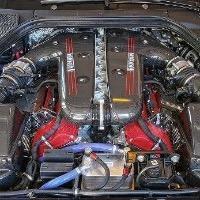
Sono interessato a questo modello esatto per costruirne una replica

638f98b9a9ed20002162fcd4-296gt3_interni_hotspot_volante_desktop_v02?

🔧Ⓜ️ MeccanicaMente - L'Automotive spiegato da chi lo vive ogni giorno. 
Seguimi per approfondimenti tecnici, novità e analisi dal mondo automotive, raccontate da un ingegnere della Motor Valley. 

A voi!

https://www.facebook.com/share/15LbshkVvd/

  • Replies 123
  • Views 44.7k
  • Created
  • Last Reply

Top Posters In This Topic

Most Popular Posts

Posted Images

4 ore fa, Gengis26 scrive:

638f98b9a9ed20002162fcd4-296gt3_interni_hotspot_volante_desktop_v02?

grazie, ma mi piacerebbe vedere anche più da vicino e da altre angolazioni, le pastiglie della frizione, il cambio

10 minuti fa, ElemenT scrive:

grazie, ma mi piacerebbe vedere anche più da vicino e da altre angolazioni, le pastiglie della frizione, il cambio

Se vai qui trovi un po' di cose: https://www.ferrari.com/it-IT/competizioni-gt/296-gt3


Oppure sul configuratore: https://carconfigurator.ferrari.com/it_IT/ferrari_car_configurator/296gt3

Edited by Rohypnol

  • 1 year later...

Create an account or sign in to comment

Background Picker
Customize Layout

Account

Navigation

Search

Search

Configure browser push notifications

Chrome (Android)
  1. Tap the lock icon next to the address bar.
  2. Tap Permissions → Notifications.
  3. Adjust your preference.
Chrome (Desktop)
  1. Click the padlock icon in the address bar.
  2. Select Site settings.
  3. Find Notifications and adjust your preference.