
- 0
-
Contenuti simili
-
Cambio batteria ibrida Toyota Prius
Pubblicato da elucevanlestelle,
- manutenzione auto
- ricambi auto
- (e 7 altri in più)
- 7 risposte
- 32909 visite
-
Consiglio sito e-commerce per gomme auto 1 2
Pubblicato da Hetfield88,
- pneumatici online
- acquisto pneumatici
- (e 4 altri in più)
- 12 risposte
- 9437 visite
-
- 31 risposte
- 5784 visite
-
-
-



-
-
-
Discussioni in Corso
-
-
Navigatori in questa sezione
- Nessun utente registrato visualizza questa pagina.
-
-



























Domanda
grayfox_89
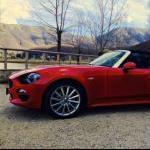
Salve a tutti ragazzi, mi piacerebbe quest'anno raggiungere le qui vicine montagne innevate di Roccaraso con la 124. Non trovo però la soluzione per portarmi dietro gli sci. Dispongo di un portapacchi come questo qui
Ma non sono riuscito a capire se devo acquistare un accessorio specifico per portare gli sci. Qualcuno che ha più esperienza di me con spider e neve?
Grazie mille
Link al commento
Condividi su altri Social
12 risposte a questa domanda
Messaggi Raccomandati:
Crea un account o accedi per lasciare un commento
Devi essere iscritto per commentare e visualizzare le sezioni protette!
Crea un account
Iscriviti nella nostra community. È facile!
Registra un nuovo accountAccedi
Sei già registrato? Accedi qui.
Accedi Ora