Jump to content
View in the app

A better way to browse. Learn more.

Autopareri

A full-screen app on your home screen with push notifications, badges and more.

To install this app on iOS and iPadOS
  1. Tap the Share icon in Safari
  2. Scroll the menu and tap Add to Home Screen.
  3. Tap Add in the top-right corner.
To install this app on Android
  1. Tap the 3-dot menu (⋮) in the top-right corner of the browser.
  2. Tap Add to Home screen or Install app.
  3. Confirm by tapping Install.
Message added by __P,

7E3A9BD7-AD9F-4169-9F63-DDDC54F42FA9.thumb.jpeg.d4c114b1833b232615ae96caa8c7b2da.jpeg

Featured Replies

  • 4 weeks later...
  • Replies 84
  • Views 27.4k
  • Created
  • Last Reply

Top Posters In This Topic

Most Popular Posts

  • Ho visto lei che copia lei che copia lei che copia me Mon amour, amour, ma chi copi tu? 

  • MotorPassion
    MotorPassion

    Bentornato Brucomela 😍🥰

  • Tony ramirez
    Tony ramirez

    è un peccato che ha quell'ora debba contare quante foglie ha l'albero che vedo dal balcone altrimenti giuro l'avrei guardato...  

Posted Images

  • 2 weeks later...

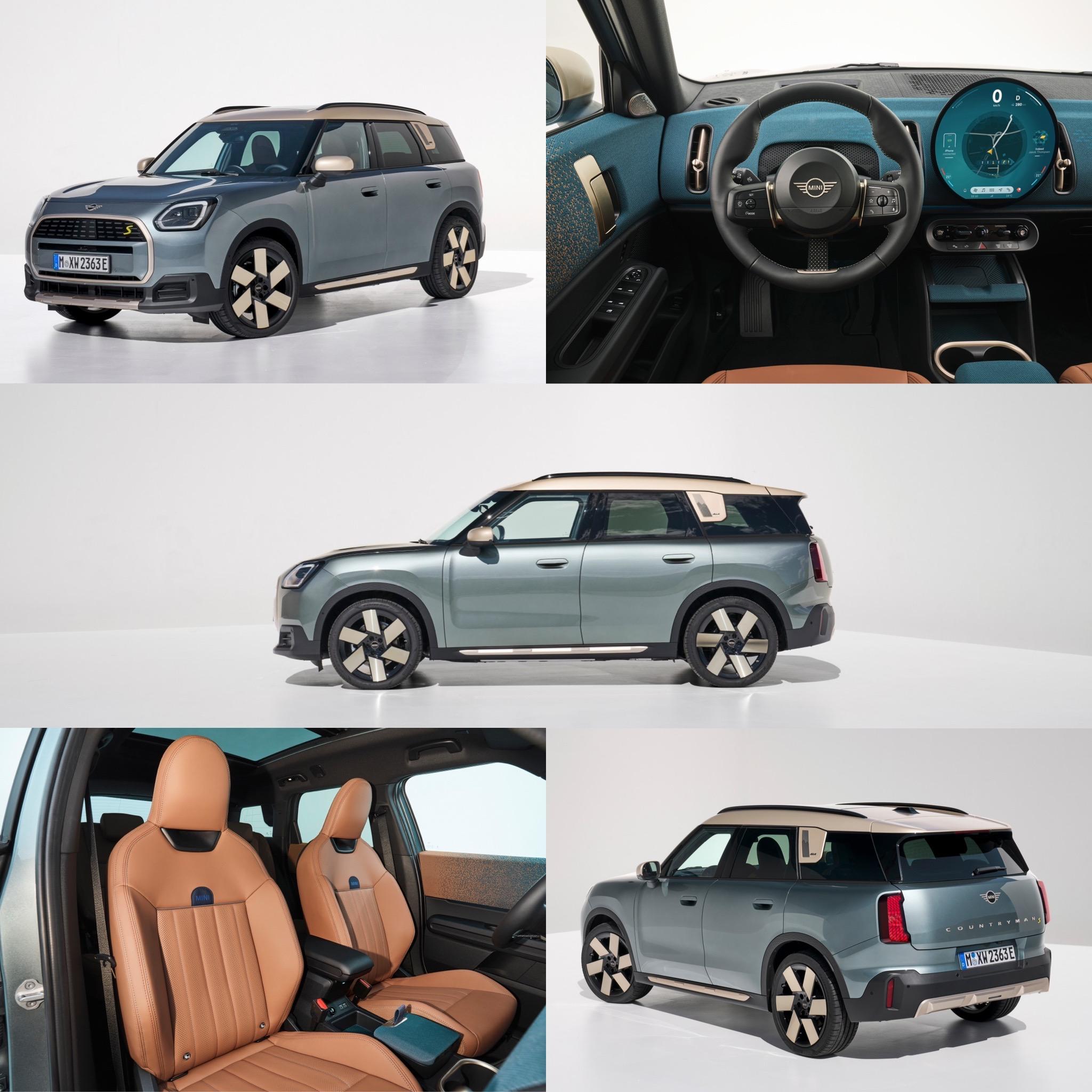
In questi giorni ho visto parecchie bisarche cariche di Countryman e devo dire che dal vivo è nettamente meglio che non in foto.


"Qualche emiro che compra una Ferrari lo troverò sempre. Ma se il ceto medio finisce in miseria, chi mi comprerà le Panda?"

Sergio Marchionne


Follow me on Instagram

  • 3 weeks later...

Appena vista una ferma davanti alla mia vetrina.


Mamma mia, sto male. Ma quanto è brutta?!


  • 5 months later...

Create an account or sign in to comment

Background Picker
Customize Layout

Configure browser push notifications

Chrome (Android)
  1. Tap the lock icon next to the address bar.
  2. Tap Permissions → Notifications.
  3. Adjust your preference.
Chrome (Desktop)
  1. Click the padlock icon in the address bar.
  2. Select Site settings.
  3. Find Notifications and adjust your preference.